
HARO vs Qwoted: Which is Better for Getting High-Quality SEO Backlinks?
Lately, I’ve been hopping on 30-minute calls with business owners from all sorts of industries, showing them how to land backlinks and earn PR coverage on their own.
And somehow, HARO and Qwoted always come up. Every single time. That’s exactly what pushed me to finally sit down and write this.
In this article, I’ll break down HARO vs Qwoted, how each one works, where they differ, and how they perform, so you know what to expect and which platform might suit you best.
How HARO Works
HARO is an expert-sourcing platform that sends you three email digests a day containing journalist queries from different media outlets. Each email lists dozens of requests across topics, and all you really need to do is scan through them, look for queries that match your expertise, and reply with your pitch.
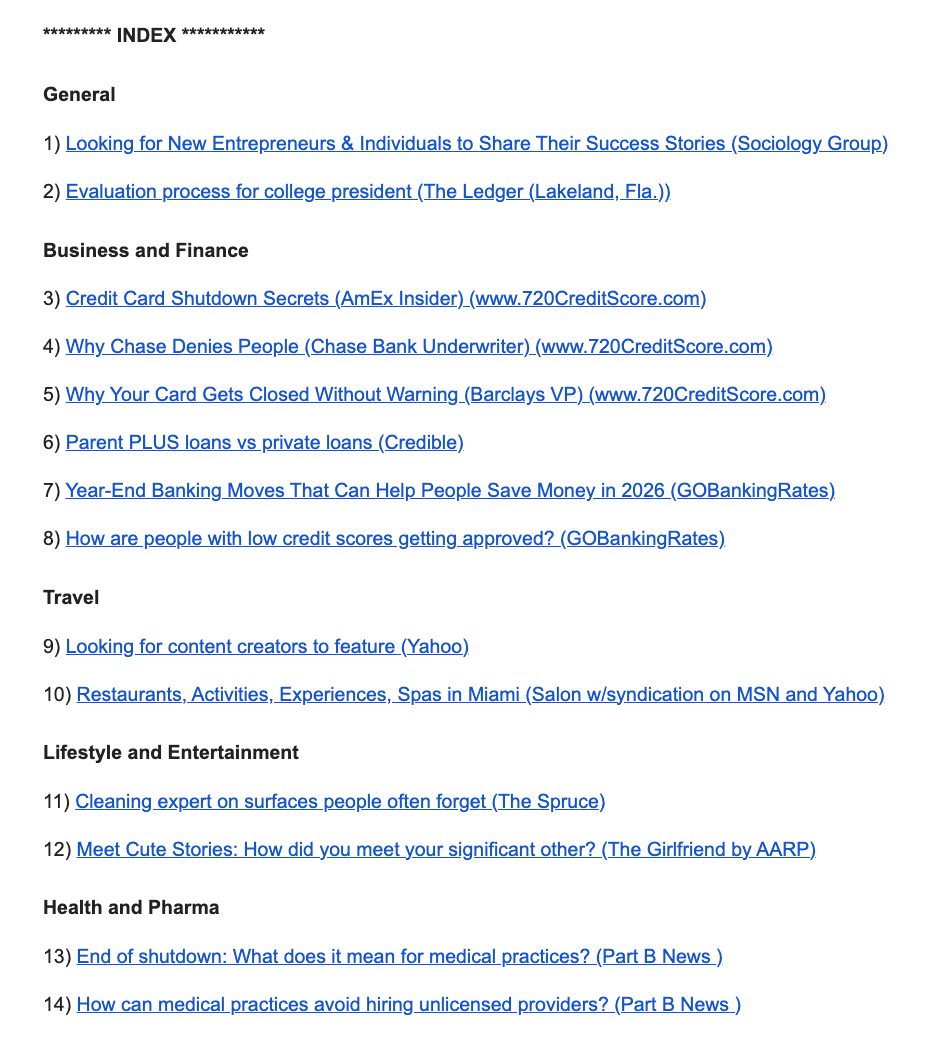
That means, everything happens right inside your inbox, as straightforward as checking your email and hitting “reply.” No dashboards to learn, no new interface to figure out.
The best part? It’s free. You can send as many pitches as you want, to your heart’s content.
Each request shows the journalist’s name, the publication they’re writing for, the topic they need help with, a short description of what they’re looking for, deadlines, and the exact questions you need to answer.
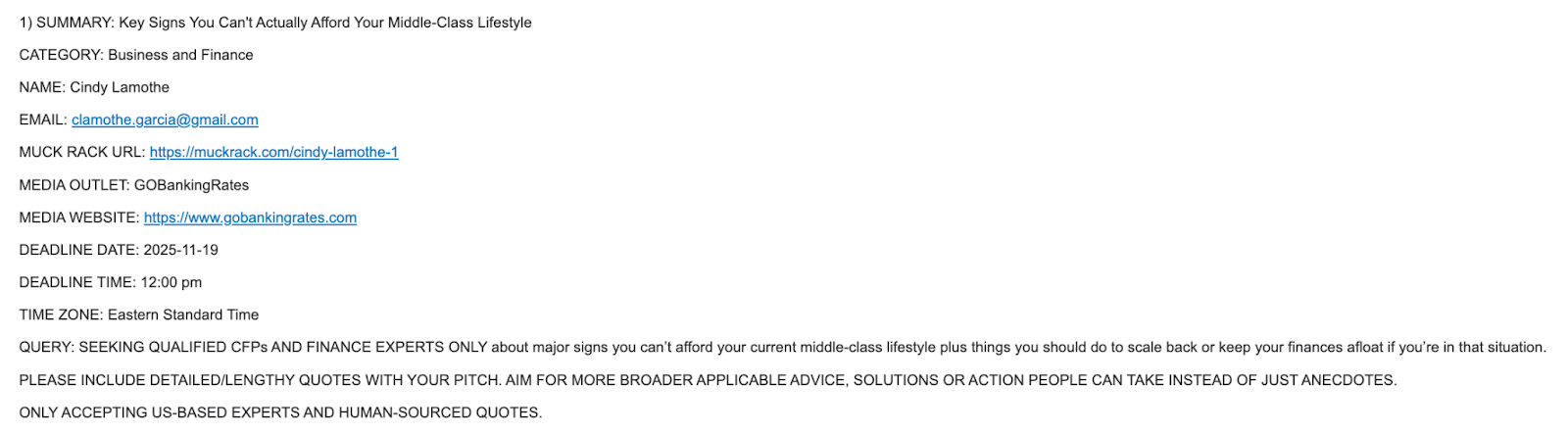
HARO is one of those platforms that's never left out of conversations among journalists and digital media circles for three main reasons.
For one, it’s been around since 2008, starting out as a small, humble Facebook group. Two, it houses publication powerhouses like Forbes, USA Today, and Business Insider, where landing a placement can do wonders for your brand.
In fact, The New York Times is one of those outlets we’ve placed a finance client in and earned a high-quality backlink from, giving their SEO authority a huge lift.
The third reason – and not exactly the flattering kind – is that HARO has earned a reputation as a full-blown spam playground, especially after the explosion of AI content scaling tools.
That wave of misuse led to an endless flood of generic, copy-and-paste pitches, which is a headache for journalists trying to find real experts. And for you as the SME, it means your pitch has to claw its way out to avoid being swallowed by the whirlpool of AI slop.
HARO Pros and Cons
With all that said, below's a quick rundown of HARO's pros and cons:
Pros:
It’s free. There’s no reason not to use it if you’re just starting out.
All email-based. No need to learn a new platform or tool. Just check your inbox and reply.
It includes some of the biggest publications out there. Getting a link from one of them can seriously boost your SEO. But even if the mention is unlinked (which happens often), just getting featured can elevate your credibility as an SME, and by extension, your brand’s authority.
Cons
Can get overwhelming pretty fast. Getting three separate email digests a day, every day, for as long as you’re subscribed, can make an already packed inbox even messier. You’ll probably need to set up some form of organization, whether that’s filters, tags, or even creating a dedicated email just for HARO.
Going through each query manually can be time-consuming. The strictly email-based setup doesn’t help either. It adds up to a lot of scrolling and mental fatigue.
Competition is tight, mainly because HARO is free and accessible. You’re not just competing with other legitimate SMEs, but also with spammers and AI-generated pitches. Basically a rat race.
"Shaky" track record. With HARO’s history of ups and downs, from getting acquired by Cision, rebranded, shut down, and now revived under Featured.com management, you probably shouldn’t put all your backlink-strategy eggs in the HARO basket.
Doesn’t offer any kind of pitch tracking or keyword alerts. So unless the journalist follows up directly, you’ll have to manually check if your quote was published and whether you got the backlink.
On that last bullet, one thing that’s helped us (and will probably help you, too) is setting up Google Alerts. It’s easy and takes just a minute to do
How Qwoted Works
Established in 2018, Qwoted is a much newer expert-sourcing platform that runs everything through a profile-based approach. Think of it like Facebook or LinkedIn, but built specifically for getting earned media opportunities and building relationships with journalists.
If you're just starting out, here’s what the workflow usually looks like:
You sign up for an account.
You enter keywords related to your expertise or niche.
You scroll through the results and select queries you’re confident you can respond to with real insight.
Each result shows the media outlet, the headline of the query, the tags or topics it's related to, the deadline, and when it was posted. Basically, everything you need to decide whether it's worth pitching.
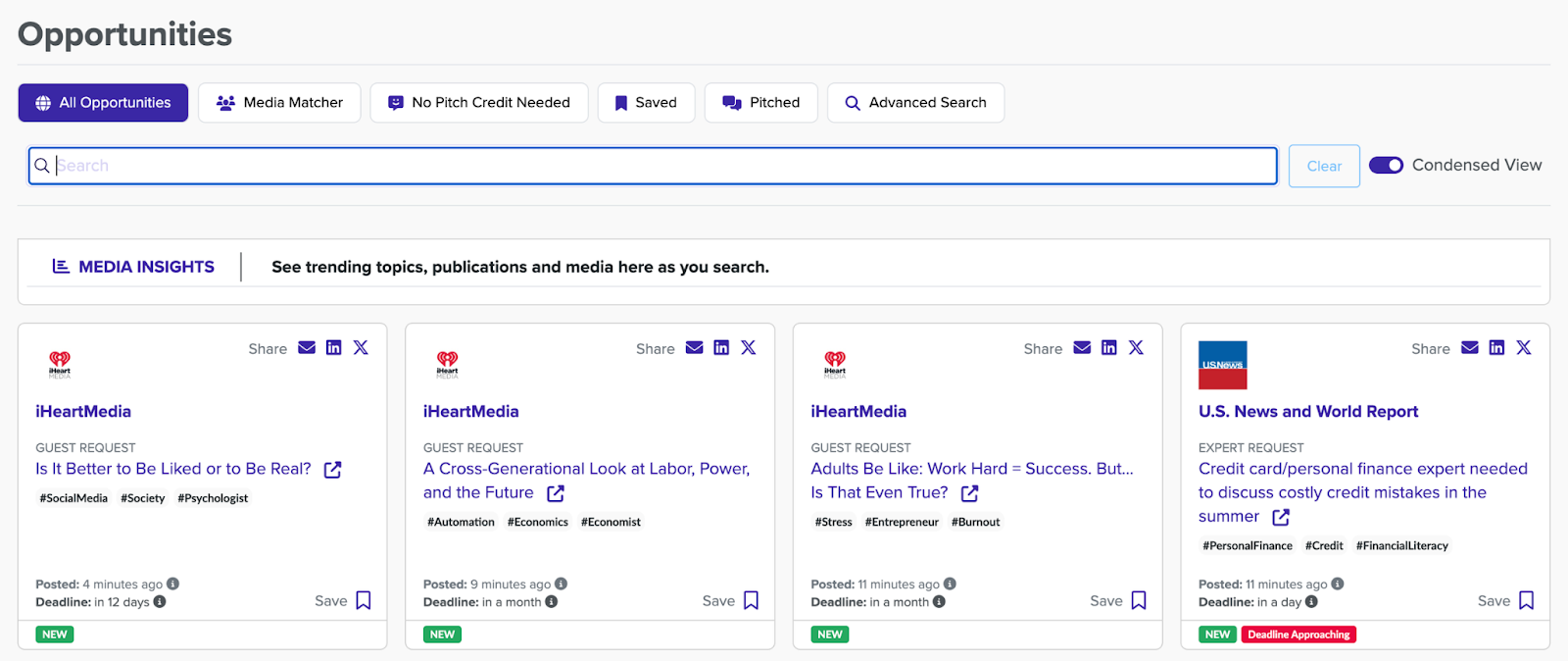
As you can see, queries are neatly laid out, which makes it much easier and faster to filter and find source requests that actually match your area of expertise
And it only gets better. Qwoted also gives you access to some pretty solid features:
Profile setup: You can build out a full profile that includes your bio, credentials, past media features, areas of expertise, and social links. Journalists can use it to vet your credibility before quoting you or even reach out directly when they’re sourcing experts for future stories.
Matching system: Once your profile is fully set up and you've added your relevant "hashtags" (e.g. #marketing, #personalfinance, #mentalhealth), Qwoted’s algorithm starts matching you with relevant media opportunities automatically. No need for endless scrolling as the right queries come to you.
Daily email alerts: Even though Qwoted is profile-based at its core, you still get the option to receive daily email digests of matching queries.
Pitch intelligence: You can see how many pitches have already been submitted, how many were opened by the journalist, and how many got responses. That kind of visibility helps you quickly figure out where your time is better spent.
Read receipts: You get notified when a journalist opens your pitch. No guesswork necessary.
Qwoted Pros and Cons
With all that said, here's a quick rundown of Qwoted's pros and cons:
Pros
Clean, user-friendly interface. The layout’s easy to navigate, and beginners will likely get the hang of it quickly.
Saves time when finding relevant source requests, thanks to its matching system. And the fact that journalists can view your profile directly is especially useful for niche spaces.
Read receipts let you track pitch views. You’ll know if a journalist opened your pitch, so you’re not left guessing.
Great for relationship-building. Beyond backlinks, Qwoted helps you build long-term relationships with journalists, making future placements easier to earn.
Cons
The free plan is extremely limited. You only get two pitches per month and a two-hour delay before you can respond, which can be a dealbreaker considering how journalists get instantly flooded with pitches within minutes of posting.
Still a new platform to learn. While user-friendly, it’s still something new to figure out especially if you’re used to simple email-based tools like HARO.
HARO vs Qwoted: Which Is Better?
Here’s a quick side-by-side Qwoted vs HARO comparison.
| Aspect | HARO | Qwoted |
|---|---|---|
| Interface | 100% email-based; no dashboard | Clean, centralized dashboard + email alerts |
| Setup Complexity | Minimal (just open emails and reply) | Requires creating a full profile, setting hashtags, etc. |
| Query Visibility | Manual scanning through email digests | Organized feed with filters, search, tags, deadlines |
| Cost | Free | $149/month for Pro |
| Free Plan Limits | Unlimited pitches | Only 2 pitches/month + 2-hour delay |
| Pitch Tracking | None | Includes pitch views, opens, and journalist responses |
| Journalist Access | Only through email responses | Journalists can view your profile, verify your credentials, and contact you directly |
Success Rates
If you're wondering which of the two will get you faster results – or more success in terms of accepted pitches – here's the truth: There's no better or worse.
Pitch success all comes down to three things:
Strategy: Whether the platform fits your niche, how well you’ve thought through ROI, what kind of metrics you’re tracking, and whether this is the best use of your time and effort.
Consistency: No matter how excellently crafted your pitch may be, there's no guarantee it will land. It’s a numbers game, and the more at-bats you have, the better your odds.
Skills: Someone who knows the ins and outs of a platform – and how to write a strong pitch – will always have better results than someone just figuring things out.
I will say this though: Qwoted, with features like the matching system, pitch intelligence, and read receipts, gives you more control over your strategy compared to HARO’s much stiffer, email-only setup.
Still, if you don't know how to take full advantage of those features, it won’t matter how advanced the platform is.
Beginner Friendliness
This one's up for debate, but in terms of beginner-friendliness, I'd hand this round to Qwoted due to the simple fact that it keeps everything in one place.
You can send and track your pitches, get insights on the source requests and media users, and still navigate the whole thing without feeling like you're learning quantum mechanics.
Sure, you could argue HARO is beginner-friendly too. After all, who doesn’t know how to use email?
But the catch is you’ll need to put in extra effort to manually sort through each query, set up alerts, and basically build your own system on top of it. Those extracurriculars might be a turn-off for beginners who just want to plug in and go.
Cost
HARO and Qwoted are both free to start.
However, Qwoted’s free plan is very limited. Most notably, you can only send two pitches a month. If you’re serious about earning backlinks, that’s nowhere near the frequency you’ll need to build consistent wins.
Qwoted's Pro Plan currently sits at $149/month, which isn’t exactly pocket change. But if cost is what’s holding you back, it’s totally fine to squeeze as much value as you can from the free plan first while testing the waters.
Versatility
When it comes to versatility, my vote goes to Qwoted.
Backlinks are great, sure, but real off-page SEO involves broader media exposure, podcast invites, and long-term relationships. It involves positioning yourself as someone reliable whom journalists can come back to again and again.
In contrast, HARO is more of a transactional setup. You reply to an email, hope for a response, and repeat. Great for quick wins, but not as much for playing the long game.
Is HARO Better Than Qwoted?
No, neither HARO nor Qwoted is outright better. They’re built differently and serve different kinds of users, so which one’s “better” depends on your strategy, skill, and time.
How Much Do HARO and Qwoted Cost?
HARO is completely free to use. Qwoted, on the other hand, has a free plan, although it's very limited. Qwoted's Pro Plan is priced at $149/month.
Can I Use HARO and Qwoted Together?
Yes, you can, and honestly, you should. Using both platforms gives you more opportunities to pitch, more variety in media outlets, and more chances to land coverage, something we at Repulinks have been doing for years.
Want to See How We Do It?
At Repulinks, we've used both HARO and Qwoted to secure earned placements and authority links from outlets like Forbes, USA Today, and Business Insider.
I'm happy to hop on a free call to walk you through how we do it so you can see everything in action and apply the same strategies for success before you even think about hiring anyone to do it for you. Book a call today!
